Blotter can read parts of your Gmail and Calendar.
That is the uncomfortable part, so it goes first. This page shows what actually happens when it runs, what leaves your account, what our server holds right now, and how to check any of it without taking our word.
What happens when it runs
A script inside your own copy of the sheet looks for conversations with the people in your Contacts tab. It reads who wrote, who received, when, and the subject line. It never reads the text. It sends those facts to our server, gets back one status per contact, and writes it into the sheet.
Your Google account
Everything that reads anything happens in here
Gmail
message text: not read
Only conversations with people in your Contacts tab. The outside of each message, never the text.
Calendar
- Gym
- Class
- Coffee · Tom · Moelismatches a contact
- Dinner
- Study group
Only events where a contact is invited, or their first name and firm are both in the title.
Your Blotter sheet
The script runs here, on your account’s own permission. It reads the two things above, sends the facts, and writes the answer into these columns.
A small package leaves
who, to, when, subject; matching events; your contacts
A status comes back
one word per contact
Blotter’s server
Works out where each conversation stands and answers. It is sent facts, never the text of an email, because the script never reads the text. What it keeps is further down this page, live.
What Google lets it touch
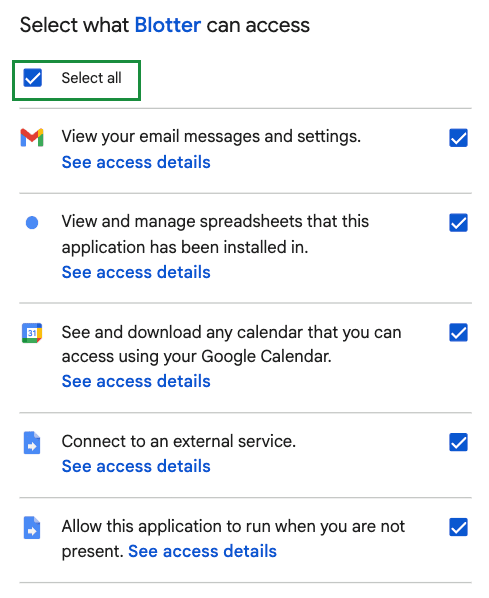
Google says it in Google’s words. In plain ones, the five are:
- Read your Gmail.
- Read your Calendar.
- Use this one spreadsheet, and no other file.
- Reach Blotter’s server.
- Run while you are away, every 15 minutes.
None of them lets it send mail, change a calendar, or open anything else in your Drive. Google decides what it may touch. The code decides what it does with that, and the code is what the rest of this page is about.
You can see the same list for your own account at any time at myaccount.google.com/permissions, and remove it there in one click.
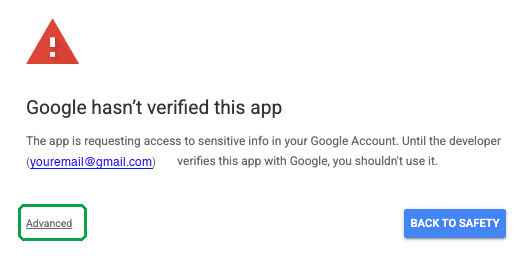
The warning you will see. Google requires a paid outside security assessment, renewed every year, before it will call an app that reads Gmail verified. Blotter is a free tool made by a student and has not paid for it yet. So Google shows this screen, with your own email address in it, because the copy of the script is in your account. It does not change what the app is allowed to do. That is fixed by the permissions on the next screen, the ones above.
What leaves your account
This is the whole package, every run. It goes to blotterib.com and nowhere else.
In the package
- For each email in a conversation with one of your contacts: who wrote it, everyone it went to, when, and the subject line. Everyone in the conversation, including anyone copied in.
- For a matching calendar event: the title, the times, who was invited, who declined, and who set it up.
- From your sheet:each contact’s name, firm and email, and whether you ticked Closed. Your own email addresses, so it can tell your messages from theirs. Addresses you said no to on the Found tab. A random number that identifies the sheet.
Not in the package
- The text of any email.
- Attachments.
- Your password, or any login for your Google account.
- Any conversation that does not involve one of your contacts.
- Anything from your calendar that does not match a contact.
The exact field-by-field version is on the technical page, and an automated check fails if the server ever accepts a field that is not listed there.
The one exception
When an email you sent cannot be delivered, Google’s mail system sends you an automatic notice. That notice is the one email Blotter opens. It reads it to find the address that bounced, so the row can say Bounced instead of leaving you waiting on a reply that will never come.
Only the addresses it finds in the notice are sent. The rest of the notice stays in your account. We say this here rather than leave it for someone to find, because a page that shows only the good news is the kind of page you should not trust.
Check it yourself
The code that does all of the above is in your own sheet, under Extensions then Apps Script. Nothing changes it but you. Paste it here and your browser checks it against the version we publish, without sending it anywhere.
In your sheet: Extensions → Apps Script. Click in the code, select all of it, copy, and paste it here.
The paste checks the code. Blotter → Check this sheet checks where it sends. Both have to pass.
Want a second opinion?
One button copies the code, Google’s permission file, every claim this site makes, and a question that asks an AI to attack all of it. Paste it into ChatGPT, Claude or Gemini and read what comes back. It will tell you what leaves your account and whether we described it honestly. It cannot tell you what our server does afterwards, and a good one will say so.
About 99 KB. Nothing is downloaded.
Read the question it copies
I am a college student. A tool called Blotter (blotterib.com) tracks my recruiting emails in a Google Sheet. To use it I have to give it permission to read my Gmail and my Google Calendar, and I want to know whether that is safe before I do. Below is everything that runs inside my Google account: the whole script, and the permissions file that tells Google what the script is allowed to touch. After that is what the website tells me it does. Check the claims against the code. The script has a long comment at the top describing itself, and the website has a privacy page. Both are claims. Neither is evidence. Only the code is evidence. Please answer in four parts. 1. In plain English, list everything that leaves my Google account, where it goes, and what causes it to be sent. Be exhaustive. If something leaves that the claims below do not mention, say so. 2. Go through the claims one at a time. Mark each TRUE, FALSE or MISLEADING, and quote the lines of code that decide it. A claim you cannot check from this code alone is UNPROVABLE, not TRUE. 3. Tell me anything this code does that would bother me, whether or not the claims mention it. 4. Tell me what you cannot know from this code alone, and what I would have to take on trust. Do not be reassuring and do not give credit for careful-looking code. If something is fine, say so in one line. If something is wrong, say exactly what it is and how much it matters. I would rather be told not to install this.
The one thing you cannot check from the code
The code shows what leaves your account and where it goes. It cannot show what our server does once the package arrives. No code you can read proves what a server keeps. That part is our word, and the next section is the closest thing to evidence we can give you for it.
What our server holds right now
- Emails
None.
There is no place in our database for one.
- The text of an email
None.
The script never reads it, so it is never sent.
- Calendar events
None.
Matching events are used to work out a status and not kept.
- Your contacts
None.
Used to work out each status, then gone.
- Sheets counted
12
A random number per sheet, with the time of its last run and how many contacts it had.
- Email addresses typed into this website
19
From the sign-up form and the contact form. Nothing from anyone's Gmail.
Read from our database at 03:46 PM UTC, as this page loaded. This shows what is in that database. It cannot prove there is no other, and we are not going to pretend it can. Every table and column, live.
Three times we were wrong
We gave the code to reviewers, most of them AI, and told them to attack it. They found things. Here are three, with what we changed. A perfect record would be the thing to worry about.
Version 4.5
The whole calendar was being sent, not just events with your contacts.
The script read every event on your calendar, a year back and six months ahead, and sent all of them to the server: titles, times and everyone invited. The server used the few that involved your contacts and threw the rest away, but the rest had already left your account. The website said, in two places, that the server receives events with your contacts.
Fixed. Events are now filtered inside your sheet, before anything leaves. This was the finding that made the audit page exist.
Version 4.8
Calendar events with no contact on them were still being sent.
After the first fix, an event was sent if any word in its title matched a contact's first name. Track someone called Sam and 'Dinner with Sam' left your account, with its full guest list, for the server to discard. A contact typed in as 'The Blackstone team' put the word 'the' on the match list and sent nearly the whole calendar.
Fixed. The sheet now runs exactly the same test the server does: the first name and the firm both have to appear in the title. A test runs both versions of the rule over 280 name-and-firm pairs and fails if they ever disagree.
Version 4.7
A stranger could have run a formula in your sheet by getting suggested as a contact.
Names on the Found tab are guarded against formulas when they arrive. The guard is a leading apostrophe, which Google Sheets treats as a text marker rather than part of the value, so when you ticked Add? the name was read back bare and written into Contacts unguarded. A Found name is the display name off an email, which the sender chooses. So: email a conversation involving one of your contacts, put a formula in your own display name, wait to be suggested, and the student ticking Add? runs it in their own account.
Fixed. Guarded on the way into Contacts as well. Ten automated checks make sure it stays guarded in both places. This was the worst thing found in three rounds, and it was found by the review that was not looking for new problems.
Every finding, including the ones that were wrong and the ones we chose to leave as they are.
What now
Look closer
The whole script, every field the server receives and returns, every table we hold, every finding.
Technical detailsDon’t give it access
That is a fair answer. If something here was missing or unclear, we would rather hear it.
Tell us